The Complete Guide to Jeep Backup Camera Operation Image Problems and Camera Systems explains how modern Jeep rear camera technology works and how drivers can solve common issues. From Wrangler models used on trails to Grand Cherokee models used for daily commuting, backup cameras have become an important safety feature for American drivers.
After working with vehicle technology guides and troubleshooting systems, I have found that many camera complaints are not caused by the camera itself. Small problems like a dirty lens, weak connector, or infotainment software error often create confusing symptoms. Understanding the full system helps owners avoid unnecessary replacements.

How Jeep Backup Camera Systems Work
A Jeep backup camera system starts when the driver shifts the vehicle into reverse. The vehicle sends a signal to activate the rear camera and display the image on the infotainment screen.
The Complete Guide to Jeep Backup Camera Operation Image Problems and Camera Systems shows that several parts must work together. The camera, wiring harness, body control system, and Uconnect display all play a role.
- ✦ Rear Camera Module
The camera captures the area behind the Jeep and sends video signals to the display.
- ✦ Wiring Connections
Cables provide power and carry image data between the camera and vehicle electronics.
- ✦ Infotainment Display
The screen shows the rear view and may add parking guidelines or warning messages.
Factory Jeep Camera Features
Many newer Jeep models include dynamic parking lines, wide-angle views, and automatic activation when reversing. These features help drivers judge distance and vehicle position.
- ✦ Dynamic Guidelines
Lines move based on steering input to help drivers understand the vehicle path.
Common Jeep Backup Camera Image Problems and Symptoms
The Complete Guide to Jeep Backup Camera Operation Image Problems and Camera Systems covers many image problems Jeep owners experience. Symptoms often reveal where the problem starts.
A black screen does not always mean the camera is broken. The issue may come from a loose plug, software problem, or missing power supply.

- ✦ Black Screen
A black image may happen because the camera has lost power or the video connection has failed.
- ✦ Blurry Image
A dirty lens, moisture inside the camera, or damaged optics can reduce image quality.
- ✦ Frozen Display
A frozen image can result from infotainment software errors or communication problems.
Understanding Warning Messages
Jeep displays may show messages such as camera unavailable or service camera system. These messages indicate that the vehicle cannot communicate correctly with the camera.
- ✦ Camera Unavailable
Check power, connectors, and system settings before replacing the camera.
Why Jeep Backup Cameras Stop Working
A Jeep backup camera can fail for many reasons. Environmental exposure, electrical faults, and normal wear can affect performance over time.
The Complete Guide to Jeep Backup Camera Operation Image Problems and Camera Systems recommends checking simple causes first because many failures do not require a complete camera replacement.

- ✦ Dirty Camera Lens
Mud, dust, snow, and road spray can block the camera view.
- ✦ Loose Wiring
Vibration from driving can loosen connectors near the rear hatch or tailgate.
- ✦ Water Damage
Damaged seals can allow moisture into the camera housing.
Jeep Wrangler Camera Problems
Wrangler models often experience camera issues because the rear area faces more dust, water, and outdoor exposure. Owners who use their Jeeps for off-road driving should inspect camera connections more often.
- ✦ Tailgate Movement
Repeated opening and closing can stress camera wiring.
How to Troubleshoot Jeep Backup Camera Problems Step by Step
A careful troubleshooting process can identify many Jeep backup camera issues without advanced tools. Start with visual checks before testing electrical components.
The first goal is to discover whether the problem comes from the camera, wiring, or display system.
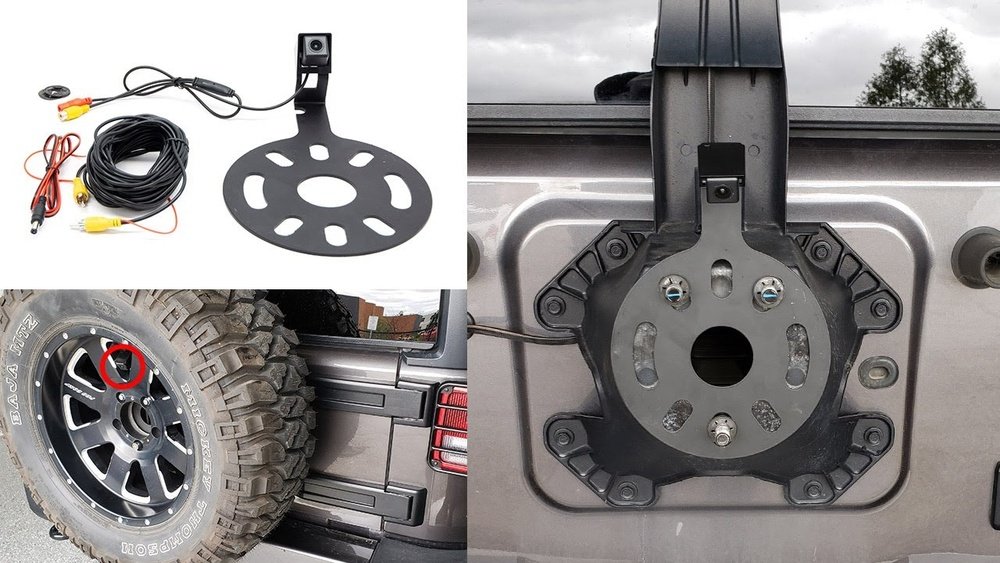
- ✦ Step 1: Clean the Camera Lens
Use a soft cloth to remove dirt or water marks from the camera lens.
- ✦ Step 2: Restart the Infotainment System
A system reset can clear temporary software problems.
- ✦ Step 3: Inspect Connections
Look for loose plugs, corrosion, or damaged wires near the rear camera.
When Professional Diagnosis Is Needed
If the camera still fails after basic checks, a technician may test voltage, communication signals, and control modules with diagnostic equipment.
- ✦ Electrical Testing
A multimeter can help confirm whether the camera receives proper power.
Jeep Backup Camera Installation and Replacement Guide
Replacing a Jeep backup camera may be needed when the camera hardware fails. Many aftermarket cameras are available, but compatibility with the vehicle system matters.
The Complete Guide to Jeep Backup Camera Operation Image Problems and Camera Systems explains that installation quality affects long-term reliability. Poor wiring work can create repeated failures.

- ✦ Factory Replacement Camera
Original equipment cameras usually provide the best compatibility with existing systems.
- ✦ Aftermarket Camera Kits
These kits can add features but may require adapters or additional wiring.
Installation Considerations
Proper cable routing, waterproof connections, and correct mounting position help prevent future camera problems.
- ✦ Secure Connections
Use protected connectors to reduce corrosion risk.
Maintaining Jeep Backup Camera Performance
Regular maintenance keeps the backup camera system working correctly. Simple habits can prevent many image problems.
Drivers who use Jeeps in harsh weather or off-road environments should inspect the camera more frequently.

- ✦ Clean Regularly
Remove dirt and water buildup from the camera lens.
- ✦ Check Damage
Inspect the camera housing and wiring after impacts or rough driving.
Protecting Camera Electronics
Avoid using harsh chemicals on the camera lens because they may damage protective coatings.
- ✦ Gentle Cleaning
Use mild cleaners and soft materials for camera maintenance.
Frequently Asked Questions about Complete Guide to Jeep Backup Camera Operation Image Problems and Camera Systems

Jeepexplorerr
Contributor