The Complete Guide to Jeep USB Ports Charging Ports and Mobile Device connectivity helps drivers understand how modern Jeep technology works in daily use. From a morning commute in the city to a long road trip across the United States, reliable phone access has become an important part of driving.
After working with vehicle technology systems, I have seen many drivers confuse a charging port with a data port. A Jeep USB connection can do different jobs depending on the port type, cable, and infotainment system. Knowing these details saves time when setting up navigation, music, or phone charging.

Understanding Jeep USB Ports and Charging Port Functions
The Complete Guide to Jeep USB Ports Charging Ports and Mobile Device Connectivity starts with understanding that Jeep vehicles use USB ports for more than simple charging. These ports may provide power, data communication, or both depending on the vehicle model and year.
Modern Jeep models often include USB-A and USB-C ports. USB-A is the older rectangular connection, while USB-C is smaller and supports newer devices with faster charging options.
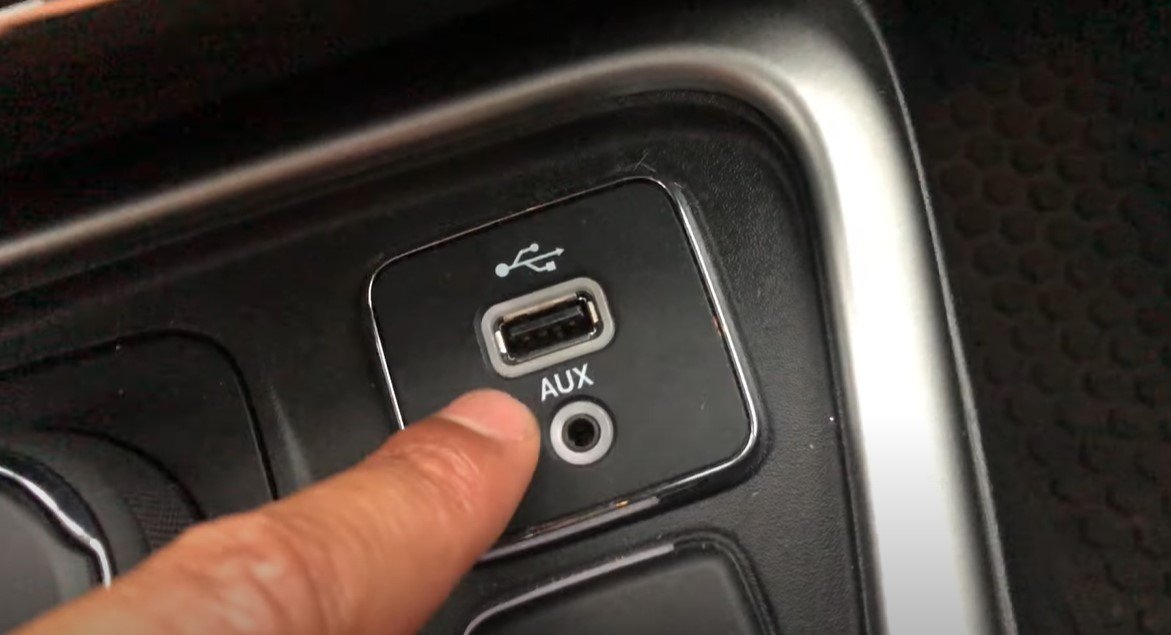
- ✦ Charging Function
A USB charging port sends electrical power to your phone, tablet, or accessory device.
- ✦ Data Connection
Some Jeep USB ports allow communication between your phone and the Uconnect infotainment system.
- ✦ Accessory Support
USB ports can support devices like media players, storage drives, and compatible accessories.
USB-A Versus USB-C in Jeep Vehicles
USB-A ports remain common in many older Jeep models. USB-C ports are becoming more popular because newer smartphones and electronics use this connector style.
The connector shape does not always determine speed. The actual power rating and vehicle system design control charging performance.
- ✦ USB-A
Common older port type used for charging and basic smartphone connections.
- ✦ USB-C
Newer connection type designed for modern devices and improved power delivery.
How Jeep USB Ports Work With Apple CarPlay and Android Auto
Many Jeep owners use USB connectivity for Apple CarPlay and Android Auto. These systems allow drivers to access maps, calls, messages, and music through the vehicle display.
A compatible phone, quality cable, and supported Jeep infotainment system are required. Wireless options are available in some newer Jeep models, but wired connections remain common.

- ✦ Apple CarPlay
Allows iPhone users to access selected apps through the Jeep infotainment screen.
- ✦ Android Auto
Provides Android phone integration for navigation, communication, and entertainment.
- ✦ Cable Quality
A damaged or low-quality cable can prevent smartphone connection even when the USB port works.
Common Smartphone Connection Steps
Start by turning on your Jeep and connecting your phone with a compatible USB cable. The infotainment system should detect the device within seconds.
If the connection fails, check phone permissions, unlock the device, and test another cable.
- ✦ Step One
Use a certified charging and data cable.
- ✦ Step Two
Accept phone connection requests on the screen.
Jeep USB Charging Speed and Power Output Explained
Charging speed is one of the most misunderstood parts of Jeep mobile connectivity. A USB port may charge a phone slowly if it does not provide enough power for modern fast-charging technology.
The phone battery level, temperature, cable quality, and port output all affect charging performance.

- ✦ Standard Charging
Provides basic power for maintaining or slowly increasing battery level.
- ✦ Fast Charging
Requires compatible hardware, power output, and supported charging standards.
- ✦ Power Sharing
Multiple connected devices may reduce available power per device.
Why Your Jeep Phone Charges Slowly
A slow charge does not always mean the USB port is broken. Many cases involve older cables, phone settings, or using a port designed mainly for data.
Testing with another cable and another device can quickly identify the cause.
- ✦ Cable Problem
A damaged cable can limit power transfer.
- ✦ Port Limitation
Some ports provide less power than dedicated chargers.
Common Jeep USB Port Problems and Troubleshooting Solutions
The Complete Guide to Jeep USB Ports Charging Ports and Mobile Device Connectivity must include troubleshooting because USB issues are common. Drivers often experience charging failures, lost connections, or random disconnects.
Most problems have simple causes. Checking the cable, cleaning the port, restarting the infotainment system, and updating software can solve many issues.

- ✦ USB Port Not Charging
Check the fuse, cable, device settings, and port condition.
- ✦ Phone Not Detected
Try another cable and confirm smartphone compatibility.
- ✦ Connection Drops
Software updates and cable replacement often fix unstable connections.
Basic Jeep USB Troubleshooting Checklist
Begin with simple checks before replacing hardware. Most USB issues come from connection problems rather than major electrical failures.
A clean test with a different phone can show whether the issue is inside the Jeep or the device.
- ✦ Test Another Cable
Use a high-quality cable that supports data transfer.
- ✦ Restart System
Restarting the Uconnect system can clear temporary software errors.
Best Practices for Jeep Mobile Device Connectivity
Good habits improve the reliability of Jeep USB connections. Drivers should use quality cables, keep ports clean, and avoid cheap accessories that may damage connections.
For American drivers who spend hours commuting or traveling, stable phone integration improves safety and convenience.

- ✦ Use Certified Accessories
Certified cables and chargers usually provide better performance and safety.
- ✦ Keep Ports Clean
Dust and debris can block proper electrical contact.
- ✦ Avoid Overloading
Connecting too many devices may reduce performance.
Choosing Jeep USB Accessories
Drivers can add USB hubs, adapters, and charging accessories, but compatibility matters. Choose products designed for automotive use.
Poor accessories may create connection problems or fail to work with Jeep infotainment systems.
- ✦ Cable Length
Choose a practical length that avoids clutter inside the cabin.
- ✦ Build Quality
Strong connectors last longer with daily vehicle use.
Frequently Asked Questions about Complete Guide to Jeep USB Ports Charging Ports and Mobile Device Connectivity

Jeepexplorerr
Contributor